Why Loops Matter in Your Coding Journey
Hey, imagine you're coding and need to handle repetitive tasks without writing the same lines over and over. That's where loops come in—they let you execute a chunk of code multiple times based on specific rules. For instance, if you're aiming to print a greeting a bunch of times, a loop saves you from copying that code endlessly. Essentially, these tools keep running a section of your program as long as certain criteria hold up.
Getting Started with While Loops
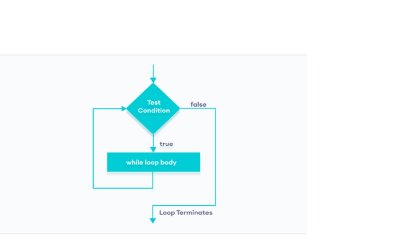
Picture a while loop as a vigilant checker: it looks at a condition you've set in parentheses right at the start. If that condition rings true, it dives into the code block inside and runs it. Once done, it circles back to check the condition again. This back-and-forth keeps going until the condition flips to false, at which point the loop bows out gracefully.
- It kicks off by assessing the given expression.
- True? Execute the inner code.
- Loop back for another check.
- False? Time to move on.
Let's see this in action with a quick example:
class LearWhileLoop{
public static void main(String[] args) {
int i = 1;
while(i <= 5) {
  System.out.println(i);
  i++;
}
}
}
output :
1
2
3
4
5
Exploring For Loops in Depth
Now, shift gears to for loops, which are like a structured itinerary for repetition. You begin with an initialization step that sets up variables (and this only happens once). Next, it evaluates a condition—if it's good to go, the loop's body runs. Then, an update step tweaks those variables, and it loops back to recheck the condition. This cycle persists until the condition no longer holds.
- Initialization fires off first, handling variable setup.
- Condition check: True means go time for the loop body.
- Update adjusts the variables post-execution.
- Back to condition evaluation, repeating as needed.
Check out this straightforward example:
class LearForLoop{
public static void main(String[] args) {
int n = 5;
for (int i = 1; i <= 5; ++i) {
  System.out.println(i);
}
}
}
Output:
1
2
3
4
5
Choosing Between For and While: When to Use Each
Opt for a for loop when you've got a clear count of how many iterations you need—it's perfect for predictable repetitions. On the flip side, go with while when your stopping point hinges on a dynamic condition rather than a set number of runs.
Example :
public static void main(String args[]) {
{
    Scanner sc = new Scanner(System.in);
    boolean bl = true;
    while(bl)
    {
        System.out.print("Enter a character in small alphabet: ");
        char ch = sc.next().charAt(0);
        if(ch >='a' && ch <= 'z') {
            System.out.println("Good! you have entered a vowel");
            bl = false;
        }
        else
            System.out.println("Entered Character is not vowel");
    }

}
But we can also do this in for loop
public static void main(String args[])
    {

        Scanner sc = new Scanner(System.in);
        boolean bl = true;
        for (; bl; ) {
            System.out.print("Enter a character in small alphabet: ");
            char ch = sc.next().charAt(0);
            if (ch >= 'a' && ch <= 'z') {
                System.out.println("Good! you have entered a vowel");
                bl = false;
            } else
                System.out.println("Entered Character is not vowel");
        }

    }