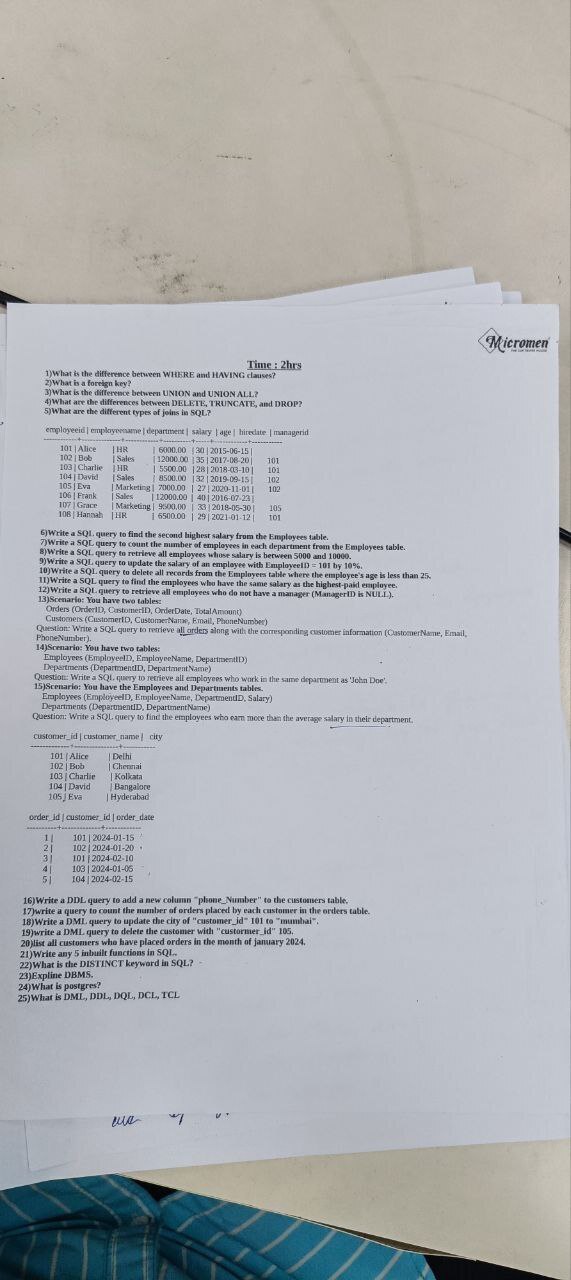
1..In PostgreSQL (often abbreviated as psql), "WHERE" and "HAVING" are both clauses used to filter rows in a query, but they are applied at different stages of the query execution process.
-
**WHERE Clause**:- Used to filter rows before any grouping or aggregation occurs.
- It applies conditions directly to the rows in the table.
- Example:
 SELECT * FROM employees
 WHERE department = 'Sales';
Here, only rows where the department is "Sales" will be retrieved.
HAVING Clause:
- Used to filter aggregated data after the
GROUP BYclause is applied. - It operates on the result of the grouping/aggregation.
-
Example:
 SELECT department, COUNT(*) AS employee_count
 FROM employees
 GROUP BY department
 HAVING COUNT(*) > 10;
In this query, departments with more than 10 employees will be selected, after the groups are formed.
Key difference: Use WHERE for filtering individual rows and HAVING for filtering groups or aggregated data.
- In PostgreSQL (psql), a foreign key is a constraint used to define a relationship between two tables, ensuring data integrity by linking a column in one table to a column in another (usually a primary key). It establishes a dependency between the two tables.
Key Characteristics:
- Referential Integrity: A foreign key enforces that the value in the child table corresponds to a valid value in the parent table.
-
References Clause: It uses the
REFERENCESkeyword to indicate the parent table and column. -
On Delete/Update Actions: Actions like
CASCADE,SET NULL, orRESTRICTdetermine what happens when a referenced row in the parent table is updated or deleted.
Example:
-- Parent Table
CREATE TABLE departments (
    dept_id SERIAL PRIMARY KEY,
    dept_name VARCHAR(50)
);

-- Child Table
CREATE TABLE employees (
    emp_id SERIAL PRIMARY KEY,
    emp_name VARCHAR(50),
    dept_id INT REFERENCES departments(dept_id) ON DELETE CASCADE
);
Explanation:
- The
departmentstable is the parent table withdept_idas the primary key. - The
employeestable is the child table, where thedept_idcolumn references thedept_idcolumn indepartments. - The
ON DELETE CASCADEensures that if a department is deleted, all employees in that department are also deleted.
- In PostgreSQL (psql), both UNION and UNION ALL are used to combine the results of two or more queries into a single result set. However, they differ in terms of how they handle duplicate rows.
Differences:
-
UNION:
- Removes duplicate rows in the combined result set.
- Performs a distinct operation, which may make it slower than
UNION ALLwhen working with large datasets. - Example:
 SELECT name FROM employees
 UNION
 SELECT name FROM managers;
Here, duplicate names appearing in both tables will be excluded from the final result.
-
UNION ALL:
- Includes all rows from both queries, even if there are duplicates.
- Faster than
UNIONbecause it doesn't check for duplicates. - Example:
 SELECT name FROM employees
 UNION ALL
 SELECT name FROM managers;
- Use UNION when you want a clean, duplicate-free result set.
- Use UNION ALL when performance is important and duplicates are acceptable
- In PostgreSQL (psql), DELETE, TRUNCATE, and DROP are commands that can remove data or database structures, but they are used in different contexts and have distinct functionalities. Here's the breakdown:
1. DELETE:
- Removes specific rows from a table based on a condition.
- It doesn't affect the table structure.
- You can use a
WHEREclause to delete only the rows you want. - It can be rolled back if you're using a transaction.
-
Example:
 DELETE FROM employees
 WHERE dept_id = 3;
The table remains, and other rows are intact.
2. TRUNCATE:
- Removes all rows from a table, effectively clearing it.
- It's faster than
DELETEbecause it bypasses triggers and does not log individual row deletions. - It can't use a
WHEREclause or delete specific rows. - It can be rolled back if wrapped in a transaction.
-
Example:
TRUNCATE TABLE employees; The table's structure remains, but all data is wiped out.
3. DROP:
- Completely removes a database object (like a table, database, or index) including its structure and data.
- Once executed, the object is gone permanently and cannot be rolled back.
-
Example:
DROP TABLE employees; -
After this, the
employeestable no longer exists.- Use DELETE for precise row removal.
- Use TRUNCATE for clearing all rows quickly while retaining the structure.
- Use DROP for completely removing a table or database object.
- In SQL, joins are used to combine rows from two or more tables based on a related column. The different types of joins are:
1. INNER JOIN:
- Returns rows that have matching values in both tables.
-
Example:
 SELECT employees.name, departments.dept_name
 FROM employees
 INNER JOIN departments
 ON employees.dept_id = departments.dept_id;
2. LEFT JOIN (or LEFT OUTER JOIN):
- Returns all rows from the left table, and the matched rows from the right table. If there's no match, it fills with
NULL. -
Example:
 SELECT employees.name, departments.dept_name
 FROM employees
 LEFT JOIN departments
 ON employees.dept_id = departments.dept_id;
3. RIGHT JOIN (or RIGHT OUTER JOIN):
- Returns all rows from the right table, and the matched rows from the left table. If there's no match, it fills with
NULL. -
Example:
 SELECT employees.name, departments.dept_name
 FROM employees
 RIGHT JOIN departments
 ON employees.dept_id = departments.dept_id;
4. FULL JOIN (or FULL OUTER JOIN):
- Returns all rows from both tables. If there's no match, it fills with
NULLon the non-matching side. -
Example:
 SELECT employees.name, departments.dept_name
 FROM employees
 FULL JOIN departments
 ON employees.dept_id = departments.dept_id;
5. CROSS JOIN:
- Returns the Cartesian product of both tables (every combination of rows from the two tables).
-
Example:
 SELECT employees.name, departments.dept_name
 FROM employees
 CROSS JOIN departments;
6. SELF JOIN:
- Joins a table with itself. This is useful when comparing rows within the same table.
-
Example:
 SELECT e1.name AS Employee1, e2.name AS Employee2
 FROM employees e1
 INNER JOIN employees e2
 ON e1.manager_id = e2.emp_id;
- SELECT MAX(salary) AS second_highest_salary FROM employees WHERE salary < (SELECT MAX(salary) FROM employees);
7.SELECT department, COUNT(*) AS employee_count
FROM employees
GROUP BY department;
SELECT *
FROM employees
WHERE salary BETWEEN 5000 AND 10000;UPDATE employees
SET salary = salary * 1.10
WHERE employeeID = 101;DELETE FROM employees
WHERE age < 25;
11.SELECT *
FROM employees
WHERE salary = (SELECT MAX(salary) FROM employees);
SELECT *
FROM employees
WHERE managerID IS NULL;SELECT
o.OrderID,
o.OrderDate,
o.TotalAmount,
c.CustomerName,
c.Email,
c.PhoneNumber
FROM
Orders o
JOIN
Customers c ON o.CustomerID = c.CustomerID
ORDER BY
o.OrderDate DESC;SELECT e.EmployeeID, e.EmployeeName, d.DepartmentName
FROM Employees e
JOIN Departments d ON e.DepartmentID = d.DepartmentID
WHERE e.DepartmentID = (
SELECT DepartmentID
FROM Employees
WHERE EmployeeName = 'John Doe'
)
AND e.EmployeeName != 'John Doe';SELECT e.EmployeeID, e.EmployeeName, e.Salary, d.DepartmentName,
dept_avg.AvgSalary AS DepartmentAverageSalary
FROM Employees e
JOIN Departments d ON e.DepartmentID = d.DepartmentID
JOIN (
SELECT DepartmentID, AVG(Salary) AS AvgSalary
FROM Employees
GROUP BY DepartmentID
) dept_avg ON e.DepartmentID = dept_avg.DepartmentID
WHERE e.Salary > dept_avg.AvgSalary
ORDER BY d.DepartmentName, e.Salary DESC;ALTER TABLE Customers
ADD COLUMN phone_number VARCHAR(15);
17.SELECT
c.customer_id,
c.customer_name,
COUNT(o.order_id) AS number_of_orders
FROM
Customers c
LEFT JOIN
Orders o ON c.customer_id = o.customer_id
GROUP BY
c.customer_id, c.customer_name
ORDER BY
number_of_orders DESC;
UPDATE Customers
SET city = 'Mumbai'
WHERE customer_id = 101;DELETE FROM Customers
WHERE customer_id = 105;SELECT DISTINCT c.customer_id, c.customer_name, c.city
FROM Customers c
JOIN Orders o ON c.customer_id = o.customer_id
WHERE o.order_date BETWEEN '2024-01-01' AND '2024-01-31'
ORDER BY c.customer_name;
21.Here are 5 essential SQL inbuilt functions categorized by their purpose:
1. String Functions
UPPER() – Converts text to uppercase
SELECT UPPER(customer_name) FROM Customers; -- 'Alice' → 'ALICE'
CONCAT() – Combines strings
SELECT CONCAT(customer_name, ' (', city, ')') FROM Customers; -- 'Alice (Delhi)'2. Numeric Functions
ROUND() – Rounds a number
SELECT ROUND(123.4567, 2); -- Result: 123.46
ABS() – Returns absolute value
SELECT ABS(-15); -- Result: 153. Date Functions
CURRENT_DATE – Returns today's date
SELECT CURRENT_DATE; -- 2024-07-20 (if run today)
DATEDIFF() – Calculates days between dates
SELECT DATEDIFF('2024-01-31', '2024-01-01'); -- Result: 304. Aggregate Functions
COUNT() – Counts rows
SELECT COUNT(*) FROM Orders; -- Total orders
AVG() – Calculates average
SELECT AVG(salary) FROM Employees; -- Average salary5. Conditional Functions
COALESCE() – Returns first non-NULL value
SELECT COALESCE(phone_number, 'N/A') FROM Customers; -- Replaces NULL with 'N/A'
CASE WHEN – Conditional logic
SELECT
  customer_name,
  CASE WHEN city = 'Delhi' THEN 'North' ELSE 'Other' END AS region
FROM Customers;
Bonus: Window Function
ROW_NUMBER() – Assigns row numbers
SELECT
  customer_name,
  city,
  ROW_NUMBER() OVER (ORDER BY customer_id) AS row_num
FROM Customers;
Each function serves specific use cases, from data cleaning (UPPER, CONCAT) to analytics (AVG, ROW_NUMBER). Let me know if you'd like examples for a specific scenario!
22.### DISTINCT Keyword in SQL (Short Explanation)
The DISTINCT keyword removes duplicate rows from query results, returning only unique values.
Syntax:
SELECT DISTINCT column1, column2, ...
FROM table_name;
Examples:
- Get unique values from a column:
SELECT DISTINCT city FROM Customers;(Returns each city only once, even if multiple customers live there.)
- Count unique values:
SELECT COUNT(DISTINCT city) FROM Customers;(Returns the number of different cities in the table.)
- Get unique combinations of multiple columns:
SELECT DISTINCT city, department FROM Employees;(Lists each unique city-department pair.)
Key Notes:
✔ Eliminates duplicates but keeps one instance.
✔ Works with NULL values (treats NULL as a distinct entry).
✔ Can impact performance on large datasets.
Use DISTINCT when you need unique records without duplicates.
- ### DBMS in Short
A Database Management System (DBMS) is software that:
✔ Stores, manages, and retrieves structured data efficiently.
✔ Ensures security (user access control, encryption).
✔ Maintains data integrity (no duplicates, valid entries).
✔ Supports multi-user access without conflicts.
✔ Provides backup & recovery to prevent data loss.
Types:
- Relational (SQL): Tables with rows/columns (e.g., MySQL, PostgreSQL).
- NoSQL: Flexible formats like JSON (e.g., MongoDB).
Example:
SELECT * FROM Customers WHERE city = 'Delhi'; -- Fast data retrievalWhy use a DBMS?
→ Avoids redundancy, ensures consistency, and scales easily.
Drawbacks:
→ Costly setup, requires expertise.
- ### PostgreSQL (Postgres) - In Short
PostgreSQL (or Postgres) is a free, open-source relational database management system (RDBMS) that uses SQL for querying.
Key Features:
✔ ACID-compliant (ensures data integrity)
✔ Supports complex queries, JSON, and NoSQL-like features
✔ Highly extensible (custom functions, data types)
✔ Scalable for large datasets
✔ Cross-platform (Linux, Windows, macOS)
Example Query:
CREATE TABLE users (
    id SERIAL PRIMARY KEY,
    name VARCHAR(100),
    email VARCHAR(100) UNIQUE
);
Used by: Apple, Spotify, NASA, and many startups.
Why choose Postgres?
→ Free, powerful, and more advanced than MySQL for complex data needs.
- Here's a concise breakdown of key SQL command categories:
1. DDL (Data Definition Language)
- Defines database structure
- Commands:
CREATE,ALTER,DROP,TRUNCATE,RENAME -
Example:
CREATE TABLE employees (id INT, name VARCHAR(50));
2. DML (Data Manipulation Language)
- Manages data within objects
- Commands:
INSERT,UPDATE,DELETE,MERGE -
Example:
INSERT INTO employees VALUES (101, 'John');
3. DQL (Data Query Language)
- Retrieves data (just 1 command)
- Command:
SELECT -
Example:
SELECT * FROM employees;
4. DCL (Data Control Language)
- Controls access permissions
- Commands:
GRANT,REVOKE -
Example:
GRANT SELECT ON employees TO user1;
5. TCL (Transaction Control Language)
- Manages transactions
- Commands:
COMMIT,ROLLBACK,SAVEPOINT -
Example:
COMMIT;
Key Difference:
- DDL changes structure (tables/schemas)
- DML changes data inside tables
- DQL reads data
- DCL manages security
- TCL handles transactions
All work together to manage databases completely. TBD