Hey there, this one's my entry into the GitHub Copilot CLI Challenge—let's dive in!
Exploring the Creation Behind It
Picture this: I put together DevDoctor CLI, a clever tool that taps into AI to lend a hand with JavaScript-based work right from your command line. It dives deep into your project's layout, figures out the technologies you're using, handles testing with fixes on the fly, checks for style issues, whips up polished README files, and offers smart ideas to resolve those pesky JavaScript bugs—all without leaving the terminal.
At its core, this CLI aims to streamline your workflow as a developer, cutting down on hours spent troubleshooting and boosting the overall polish of your JavaScript code through intelligent, AI-backed tips.
A Quick Tour and Hands-On Look
Want to poke around? Swing by the project's home base: DevDoctor CLI GitHub Repository.
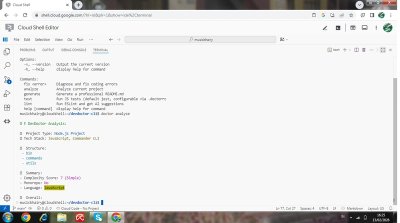
Here's a visual peek and some steps to get you started:
- Fire up
doctor analyzefor a breakdown of your project's organization and the tech it's built on. - Try
doctor fixwhen you hit a snag—it'll pull in AI to recommend solutions for those errors. - Use
doctor generateto effortlessly build out a top-notch README file from scratch. - With
doctor test, you can execute your JavaScript tests (it defaults to Jest) and get handy AI advice along the way. - Launch
doctor lintto scan for formatting hiccups via ESLint, complete with tailored AI suggestions to tidy things up.
How GitHub Copilot CLI Shaped My Journey
Throughout the process, I leaned heavily on GitHub Copilot CLI to make things click.
- It jumped in to craft the foundational setup for various commands, such as
fix,analyze,generate,test, andlint. - The tool was a lifesaver for building out the logic that manages AI prompts, particularly when it came to condensing project details or creating README material.
- Overall, it turbocharged my progress, allowing me to zero in on the big-picture architecture and flow of the CLI rather than getting bogged down in routine code writing.
Bringing DevDoctor CLI to life felt effortless and efficient thanks to Copilot CLI—it really opened my eyes to weaving AI seamlessly into everyday coding routines.